
01↗
Build without code
Work confidently in WordPress and Elementor Free using containers, widgets and styling tools.
Skip endless theory. Learn WordPress and Elementor by building a complete, mobile-responsive business website from scratch — without writing code.
Understand → Design → Build → Optimize → Launch
MORE THAN A TUTORIAL
Every lesson moves you closer to a complete four-page website. You will plan the structure, design with Elementor, connect forms, make it mobile-friendly, and publish it online.
THE FINAL PROJECT
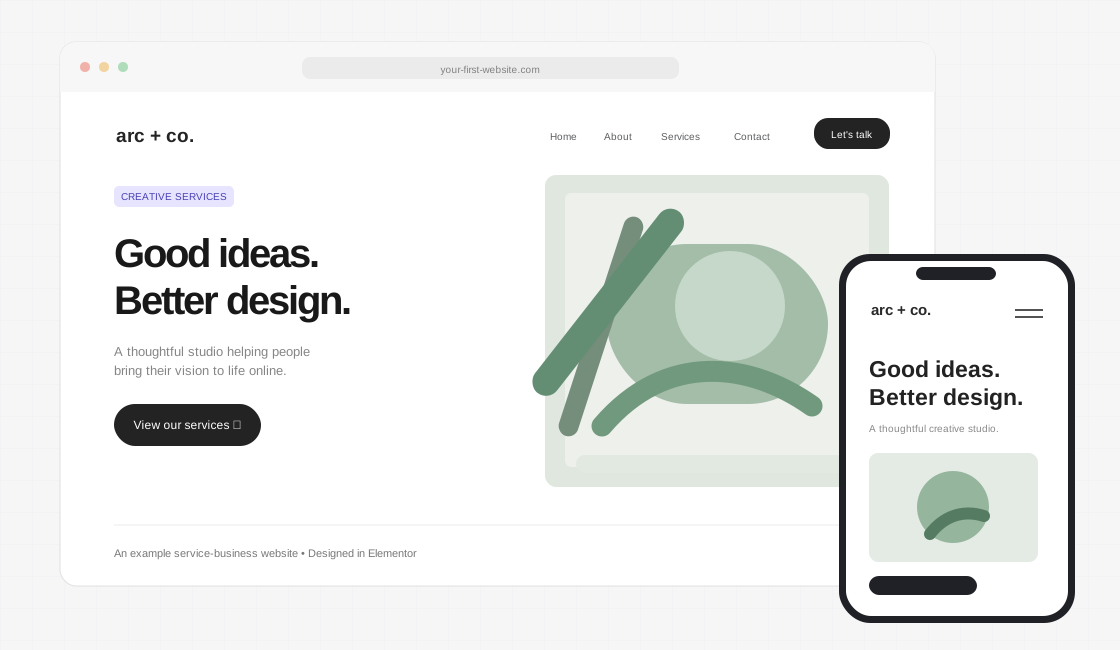
From a blank WordPress installation to a polished, responsive service-business website — follow one practical project from start to finish.
WHAT YOU WILL LEARN
Work confidently in WordPress and Elementor Free using containers, widgets and styling tools.
Plan pages, choose colors and typography, and create clean responsive layouts.
Connect navigation, forms, contact buttons, and key site settings.
Apply the basics of speed, image optimization, SEO, security and maintenance.
THE LEARNING METHOD
Short explanations and hands-on assignments help you apply each idea directly to your own project.
See the exact feature or technique.
Learn why it matters and how it works.
Apply it to the project website.
Complete a focused assignment.
YOUR COMPLETE ROADMAP
Start with the fundamentals and continue through design, launch, and basic maintenance. Expand any module to see what you’ll learn.
Understand what a website is, how it works, and which tools will be used throughout the course.
Explore the final reference website and identify its header, hero, sections, pages, and footer.
Outcome: Students understand the website-building process and know what they will create.Prepare the structure, content, and design direction before starting website development.
Create a basic website plan and organize the supplied logo, images, text, and other assets.
Outcome: A complete website blueprint and organized content ready for development.Set up a working WordPress website.
Install WordPress on hosting or an approved local practice environment and successfully access the dashboard.
Outcome: A fresh, functional WordPress installation.Learn the important WordPress controls needed for creating and managing a website.
Clean the default WordPress installation, configure essential settings, and create four blank pages: Home, About, Services, and Contact.
Outcome: A clean WordPress website prepared for design work.Understand how to build and style website sections using Elementor.
Build a practice section containing a heading, description, image, two buttons, and a styled background.
Outcome: Students can independently create, edit, and style basic Elementor sections.Learn simple design rules that make websites look clean, professional, and trustworthy.
Create the website's mini style guide with colors, fonts, heading sizes, button styles, and standard section spacing.
Outcome: A basic professional design system ready for use across the website.Create a clean, functional header that helps visitors navigate the website.
Create the complete website header with logo, page navigation, CTA button, and mobile menu.
Outcome: A functional, responsive website header.Create the first major section visitors see when they open the website.
Recreate the supplied professional hero-section design using Elementor.
Outcome: A completed homepage hero section with working CTA buttons.Create all remaining homepage sections.
Build all remaining homepage sections and combine them into one complete homepage.
Outcome: A fully designed desktop homepage.Build a complete multi-page website.
Complete the About, Services, and Contact pages and connect them to the homepage.
Outcome: A functioning four-page website.Complete the website's site-wide layout and enable customer enquiries.
Complete the footer, configure a working contact form, and test all contact methods.
Outcome: A website capable of receiving real enquiries.Optimize the entire website for desktop, tablet, and mobile devices.
Optimize all four pages for desktop, tablet, and mobile screens.
Outcome: A responsive website that is usable across different devices.Understand and apply basic website performance improvements.
Optimize website images and perform a basic speed test before and after improvements.
Outcome: A more efficient website with appropriately optimized images and basic performance settings.Prepare the website for search engines using essential SEO practices.
Optimize the four main pages with suitable URLs, page titles, descriptions, heading structures, image alt text, and internal links.
Outcome: A website configured with essential on-page SEO and ready for search-engine discovery.Learn how to keep the website secure, updated, and working properly.
Configure essential security practices, create a backup, and complete a guided troubleshooting exercise.
Outcome: Students understand how to maintain their website and handle common beginner-level problems.Complete the final checks, publish the finished website, and understand the next steps.
Publish the completed website and submit its live URL along with desktop and mobile screenshots and the completed launch checklist.
Outcome: A complete, functional, responsive, published website.WHO IT IS FOR
Made for learners who want a structured, practical introduction to making websites, not a collection of disconnected tips.
Complete beginners — no coding background
Students learning a practical digital skill
Small business owners who want a website
Aspiring creators and freelancers starting with WordPress
TOOLS USED
A paid domain or hosting plan may be required to publish your live project. These costs are separate from course enrollment.
STUDY RESOURCES
Resources shown describe the planned course learning materials; confirm availability before publishing enrollment offers.
QUESTIONS, ANSWERED
No. This course is designed for complete beginners. You will build using WordPress, Elementor Free and the Astra Free theme.
A real service-business website with Home, About, Services and Contact pages, responsive navigation, a contact form and essential SEO and security settings.
No. Lessons are based on Elementor Free. A suitable domain and hosting plan may be needed when you are ready to publish online.
Yes. Dedicated lessons cover responsive containers, typography, spacing, navigation and testing on desktop, tablet and mobile.
Yes. The final modules cover performance checks, basic SEO, backups, security, testing and publishing your website.
READY TO CREATE?
Learn by doing. Finish with a project you can show, improve and use as the foundation for your next website.
Get Course Access
ENROLLMENT & QUESTIONS
Have a question about the WordPress + Elementor mini-course? Send an enquiry below and our team can follow up using the details you provide.
Access and enrollment details are available on request.